In any business environment, printers and peripherals play a critical role in daily operations. From printing invoices and reports to scanning documents and processing data, these devices must function reliably. A proper Printer & Peripheral Setup ensures your equipment integrates smoothly with your network and supports your team’s productivity.
This article explains why professional Printer & Peripheral Setup matters, common challenges businesses face, and how the right setup improves efficiency and reduces downtime.
What Is Printer & Peripheral Setup?
Printer & Peripheral Setup involves installing, configuring, and integrating devices such as:
- Printers and multifunction devices
- Scanners and copiers
- External storage devices
- POS systems and specialty hardware
The goal of a proper Printer & Peripheral Setup is to ensure all devices communicate effectively with your network and workstations without interruptions.
Why Proper Setup Matters
Many businesses underestimate the importance of correctly setting up printers and peripherals. Poor configuration can lead to:
- Devices not connecting to the network
- Slow or failed print jobs
- Driver conflicts and compatibility issues
- Security vulnerabilities in shared devices
A professional Printer & Peripheral Setup eliminates these issues and ensures smooth daily operations.
Common Printer & Peripheral Challenges
1. Network Connectivity Issues
Printers often fail to connect properly to business networks, especially in environments with multiple users.
Proper Printer & Peripheral Setup ensures:
- Devices are correctly assigned IP addresses
- Secure connections to the network
- Reliable communication between devices and computers
2. Driver and Compatibility Problems
Incorrect or outdated drivers can cause devices to malfunction.
A proper setup includes:
- Installing the correct drivers for each device
- Ensuring compatibility with operating systems
- Regular updates to maintain performance
3. Shared Device Configuration
In offices, multiple users need access to the same printer or scanner.
Professional Printer & Peripheral Setup ensures:
- Devices are shared across the network
- Permissions are configured correctly
- Print queues are managed efficiently
4. Security Risks
Printers and peripherals can be overlooked as security risks. However, unsecured devices can expose sensitive data.
A secure Printer & Peripheral Setup includes:
- Integration with Network Security Setup
- Access control for sensitive print jobs
- Firmware updates to prevent vulnerabilities
Key Components of Effective Printer & Peripheral Setup
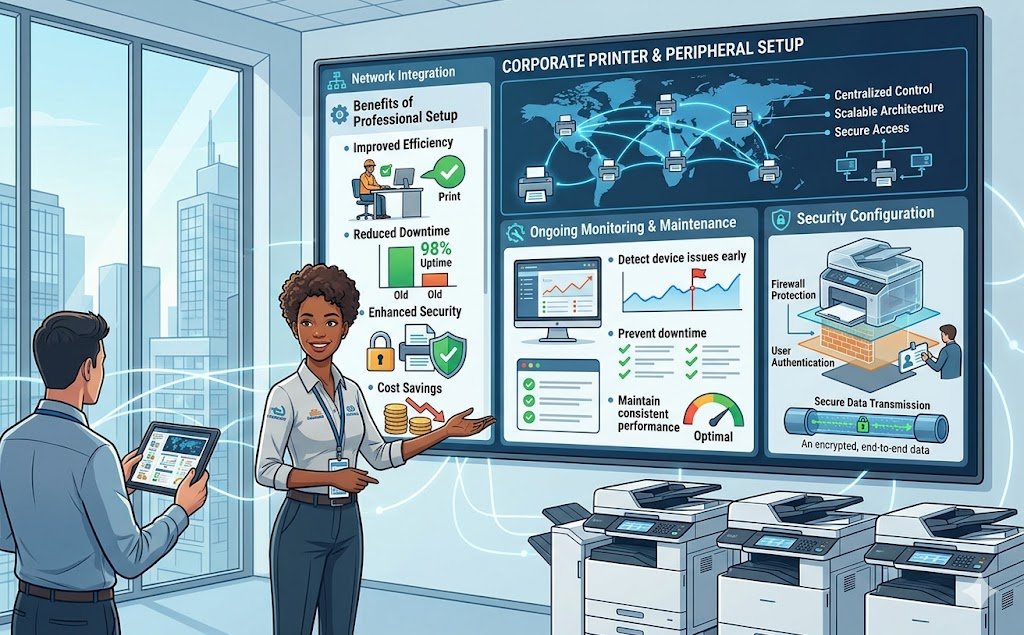
1. Network Integration
Devices must be properly connected to your network infrastructure.
This includes integration with:
- Network Design & Cabling
- Servers and shared drives
- Cloud printing systems
Proper integration ensures seamless communication and accessibility.
2. Device Configuration and Optimization
Each device should be configured for performance and efficiency.
This includes:
- Setting default print settings
- Optimizing print speeds and quality
- Reducing unnecessary resource usage
3. Security Configuration
Protecting sensitive documents is essential.
A secure setup integrates:
- Firewall & Endpoint Protection
- User authentication for printing
- Secure data transmission
4. Ongoing Monitoring and Maintenance
Like all IT systems, printers require ongoing maintenance.
Using 24/7 System Monitoring, businesses can:
- Detect device issues early
- Prevent downtime
- Maintain consistent performance
Benefits of Professional Printer & Peripheral Setup
1. Improved Efficiency
Employees spend less time troubleshooting and more time focusing on their work.
2. Reduced Downtime
Proper configuration minimizes device failures and connectivity issues.
3. Enhanced Security
Integrating printers into your Network Security Setup protects sensitive business data.
4. Cost Savings
Efficient setup reduces waste, prevents damage, and extends device lifespan.
Best Practices for Printer & Peripheral Setup
To maximize the effectiveness of your Printer & Peripheral Setup, businesses should:
- Standardize printer models and configurations
- Regularly update drivers and firmware
- Monitor device usage and performance
- Secure devices with proper access controls
- Integrate with Managed IT Support for ongoing maintenance
These practices ensure your devices remain reliable and secure over time.
How Managed IT Support Enhances Device Performance
Managing printers and peripherals internally can be time-consuming. That’s why many businesses rely on Managed IT Support to handle:
- Installation and configuration
- Troubleshooting and repairs
- Security updates and monitoring
- Integration with existing IT systems
For businesses in the GTA, providers like Ridgeway Computers offer tailored support to ensure your devices are fully optimized and integrated into your overall IT infrastructure.
Conclusion
Printers and peripherals are essential tools in any business environment, but they must be properly configured to function efficiently. A professional Printer & Peripheral Setup ensures seamless connectivity, improved productivity, and enhanced security.
By implementing:
- Proper network integration
- Secure configurations with Firewall & Endpoint Protection
- Continuous monitoring through 24/7 System Monitoring
- Ongoing support via Managed IT Support
Your business can eliminate common device issues and maintain smooth operations.
Investing in expert Printer & Peripheral Setup ensures your technology supports your business — not slows it down.